Turnitin AI and Plagiarism Checker in South Africa: Get Reports with TTN Check
Turnitin AI and Plagiarism Checker in South Africa: Get Reports with TTN Check
Finishing an assignment can feel like the easy part. The harder question often arrives just before submission: will Turnitin identify matching passages, or will its AI writing detector flag part of the text? For students in South Africa, those are reasonable questions—but a report needs interpretation, not just a quick glance at a percentage.
Whether you are based in Johannesburg, Cape Town, Pretoria and Durban, TTN Check offers an online way to request Turnitin Similarity and AI writing detection reports without your own university Turnitin login. Start at https://aiandplagiarismcheck.com/ to see the current service and checkout details.
Why students in South Africa review Turnitin reports
Students enrolled in universities, universities of technology and postgraduate programmes may be asked to demonstrate careful source use, transparent research practices and compliance with course-specific rules on generative AI. The expectations are not identical across institutions or even between modules. An instructor might allow AI for brainstorming while prohibiting AI-written submissions; another might require disclosure of certain uses.
For English-language essays, research projects and dissertations, a pre-submission report can support a final editorial review. It can draw attention to matching passages and show how an AI detector has classified qualifying prose. Neither report replaces the university’s policy, your own drafts or the judgement of academic staff.
What does *% detected as AI actually mean on Turnitin?
The following Turnitin example displays “*% detected as AI” rather than a number. This is intentional. Turnitin explains that AI detection includes the possibility of false positives—cases in which human-written text is incorrectly classified as AI-generated. Results above 0% but below 20% are not shown as exact percentages because the likelihood of false positives is higher in this range.
When a result falls in the 1%–19% range, the report uses an asterisk and does not assign numerical scores or highlights to the affected text. The asterisk does not mean 20% AI, and it is not evidence that the student cheated. It means the detector produced a low-range signal that Turnitin has chosen not to quantify in the report.
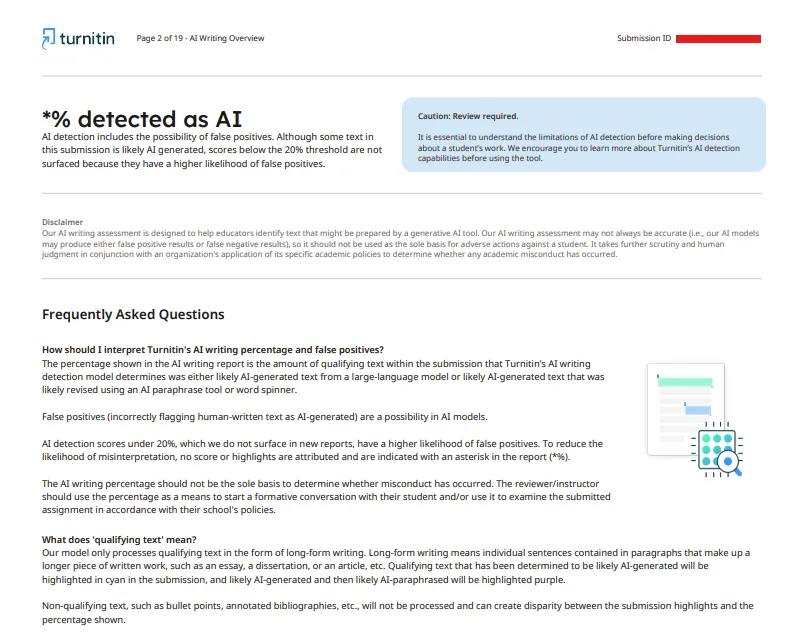
Sample Turnitin AI Writing Overview: *% detected as AI; the below-20% score is suppressed.
How should students respond to a possible false positive?
First, avoid treating a detector result as a verdict. Review the assignment brief and your institution’s AI policy. Keep research notes, drafts and document revision history where available; these may help explain your writing process. If you are concerned, ask the relevant tutor how AI detection is evaluated in your course. Rewriting merely to force a lower detector score is not a substitute for original work and appropriate disclosure.
What does 0% detected as AI mean?
The following Turnitin sample displays “0% detected as AI”. This means the system did not identify qualifying prose as likely AI-generated in that submission. It is a useful distinction from *%, but it is not a certificate of human authorship. Detectors can miss AI-generated text and can sometimes misclassify human writing. The scope of the analysis also matters: Turnitin’s AI assessment focuses on qualifying long-form prose, not every element in a document.
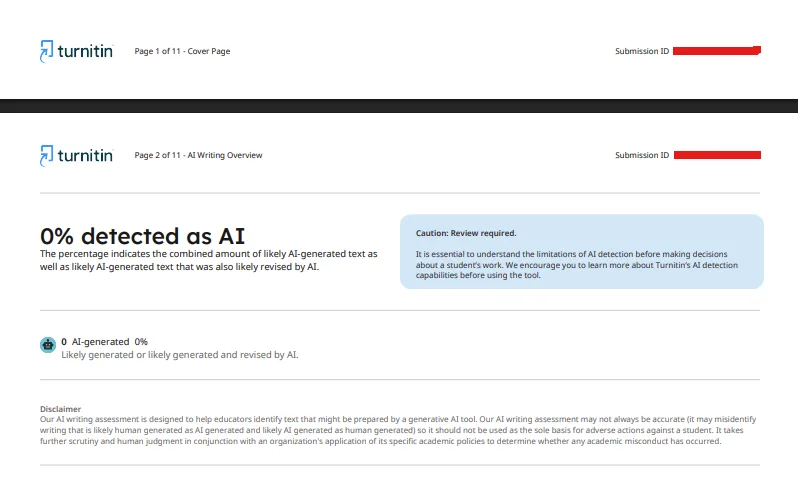
Separate sample Turnitin AI Writing Overview: 0% detected as AI.
What an 8% Turnitin similarity score tells you
The following Similarity Report shows 8% overall similarity. Its source breakdown includes 5% internet sources, 0% publications and 5% submitted student papers. These source categories may overlap, so adding them does not give the overall percentage. The sample also shows 8% in the “Not Cited or Quoted” match group and zero integrity flags for review.
In this particular example, bibliography, quoted text and matches shorter than eight words were filtered. Those settings influence what is displayed. An 8% score indicates limited matched text in the configured comparison, but it does not automatically mean “8% plagiarism”. Even a short unattributed passage may matter, while a larger match can be legitimate if it is properly cited.
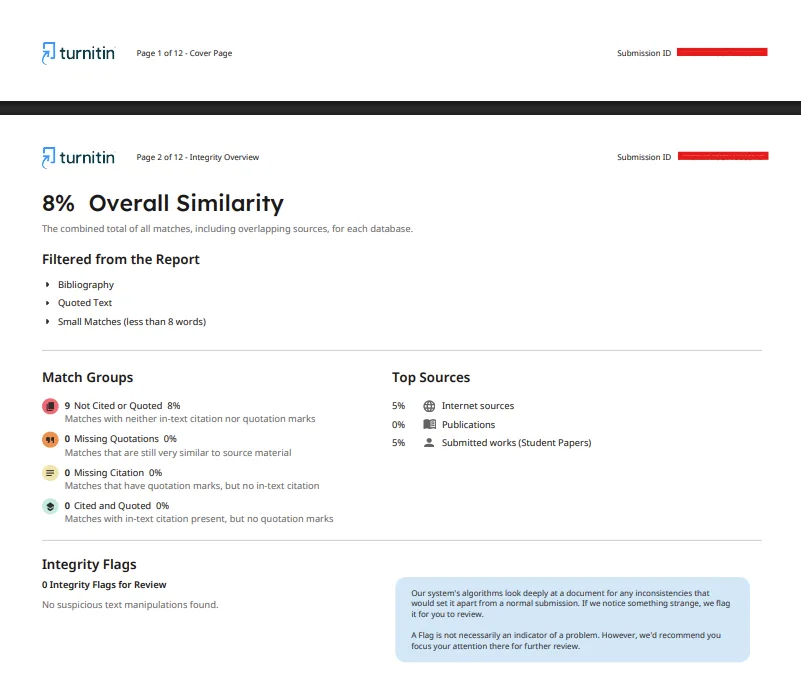
Separate sample Turnitin Integrity Overview: 8% overall similarity, with source and match-group details.
What Similarity Percentage is acceptable in South Africa?
There is no single national Turnitin percentage that guarantees acceptance at every institution in South Africa. Acceptability depends on the type of work, the matched passages, citation practices and local academic rules. Read the actual source matches rather than relying on a target number. For literature reviews, technical writing and dissertations, context is especially important.
AI detection and similarity are not the same check
A similarity report searches for overlap with material in available comparison databases. An AI writing report estimates whether qualifying text resembles output from generative AI. A document could have a low similarity score but still receive an AI flag, or a higher similarity score while having 0% AI detected. The sample images in this article come from separate submissions and should not be read as one combined result.
How to get Turnitin Reports in South Africa
1. Create a free account
Open https://aiandplagiarismcheck.com/ and register or sign in to your dashboard.
2. Upload your document
Submit an eligible Word or PDF file.
3. Request the checks
TTN processes documents for Turnitin Similarity and AI writing detection reports.
4. Review and download
Once processing is complete, reports are delivered to your secure user dashboard. TTN aims for quick turnaround, often within minutes, although actual times vary.
What does a Turnitin check cost in South Africa?
TTN document checks goes for less than USD $5 per document. The service is designed for students who want accessible, independent report requests, not a replacement for their university’s official submission channel. An external report may differ from a later institutional report because of database access, settings, filters or subsequent changes to the document.
Frequently asked questions
Does *% mean Turnitin found exactly 20% AI?
No. The asterisk replaces numerical results above 0% and below 20%. It does not provide an exact percentage.
Can a human-written paper be flagged as AI?
Yes. False positives are possible. Turnitin warns against using an AI detection result as the sole basis for adverse academic decisions.
Does 0% AI prove the paper was human-written?
No. It means the detector did not flag qualifying prose in that submission; it is not proof of authorship.
Is an 8% similarity score automatically safe?
No. Check the matching passages and follow your institution’s referencing and academic integrity requirements.
Can I request a report while studying in South Africa?
TTN Check is an online service, so you can access its website from the country.
Will TTN replace my university Turnitin submission?
No. It is an independent report-request service. Your university’s official process and rules still apply.
Check your writing with better information
Before your next submission in South Africa, use your assignment brief, your references and your own writing records as the starting point. A Turnitin report can add useful context, especially when you understand the difference between *% AI, 0% AI and 8% similarity. It cannot determine misconduct or guarantee a grade.
To request eligible reports, visit TTN Check and follow the upload steps in your dashboard.
Disclaimer: TTN is an independent document-checking service, not an official Turnitin or university website. Scores are informational, not definitive assessments of plagiarism, AI authorship or academic misconduct. Follow your institution’s rules on academic integrity.
Related Article: Turnitin AI and Plagiarism Checker United Kingdom - Get reports at TTN Check