Turnitin AI and Plagiarism Checker United Kingdom - Get reports at TTN Check
Turnitin AI and Plagiarism Checker United Kingdom (UK): Understanding AI Scores, False Positives and Similarity Reports
You've finished writing your university assignment, checked your references and reviewed your arguments. But before submitting, there's one more thing you might be wondering: What will Turnitin say about my work?
For students across the United Kingdom, Turnitin AI detection and plagiarism similarity reports have become important topics in academic writing.
Whether you're studying in London, Manchester, Birmingham, Leeds, Edinburgh or Cardiff, understanding these reports can help you review your assignments before submission.
At TTN Check – AI & Plagiarism Check, students can request Turnitin AI writing detection and Similarity Reports online without needing their own university Turnitin login.
In this guide, we'll explain what Turnitin scores mean, why some AI results appear as *%, and how TTN helps UK students access reports conveniently.
Why UK University Students Use Turnitin Checks
Academic integrity is an important part of higher education in the UK.
Universities such as the University of Manchester, University of Birmingham, University of Leeds, University of Edinburgh and King's College London have academic integrity expectations covering plagiarism, referencing and responsible academic writing.
However, policies regarding generative AI vary between institutions, courses and individual assignments.
Students often want to understand their reports before submitting coursework, dissertations or research papers.
A Turnitin check can help identify matching text, highlight possible referencing issues and provide information about AI writing detection.
Check your assignment online with TTN Check to request available Turnitin reports.
Understanding Turnitin AI Detection Scores
Turnitin AI writing detection analyses qualifying prose to estimate how much text may have been generated using AI.
Depending on the result, a report may display a numerical percentage, 0%, or an asterisk instead of a numerical score. These outcomes have different meanings.
What Does *% Detected as AI Mean?
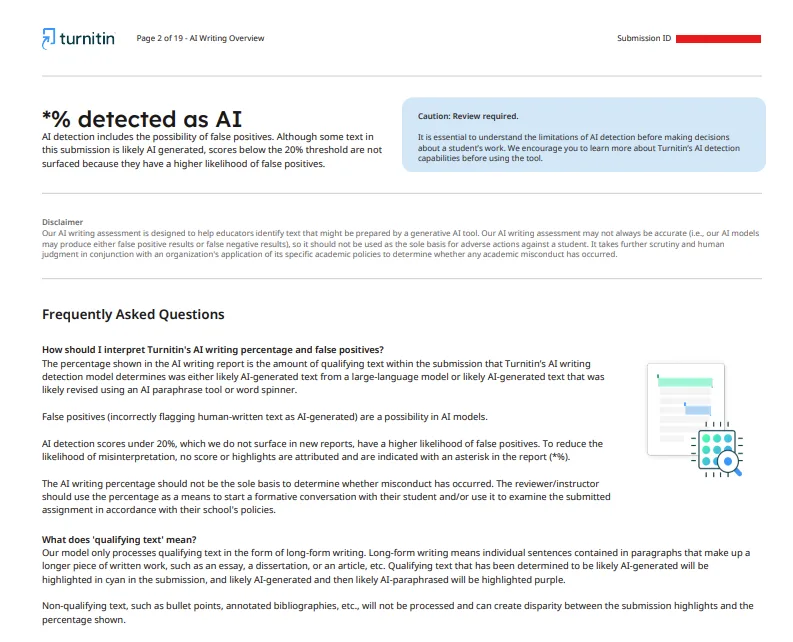
One of our sample Turnitin AI reports displays:
*% detected as AI
This result can confuse students who expect every report to display an exact percentage.
According to Turnitin's explanation, AI detection includes the possibility of false positives. For scores above 0% but below 20%, Turnitin does not surface a numerical percentage because results in this range have a higher likelihood of false positives.
Instead, the report displays an asterisk.
This means:
The detector identified some text as potentially AI-generated.
The detected amount falls below the 20% reporting threshold.
No exact AI percentage is displayed.
No AI text highlights are attributed to that result.
Importantly, *% does not mean that exactly 20% of your assignment was AI-generated.
It also does not prove that you used AI.
The asterisk represents an AI detection result that Turnitin considers too uncertain to report as a specific percentage.
What Are False Positives in Turnitin AI Detection?
A false positive occurs when an AI detection system incorrectly identifies human-written text as AI-generated.
For example, a student might independently write a well-structured academic paragraph, yet an AI detection model could incorrectly classify it as AI-produced.
Turnitin acknowledges that false positives are possible.
To reduce potential misinterpretation, Turnitin does not display numerical scores or text highlights for AI detection results between 1% and 19%.
This is particularly important for students who worry that an AI flag automatically means academic misconduct.
An AI detection result is not proof of cheating.
Universities should consider the student's writing process, relevant evidence and institutional policies rather than relying solely on an automated score.
What Does 0% Detected as AI Mean?
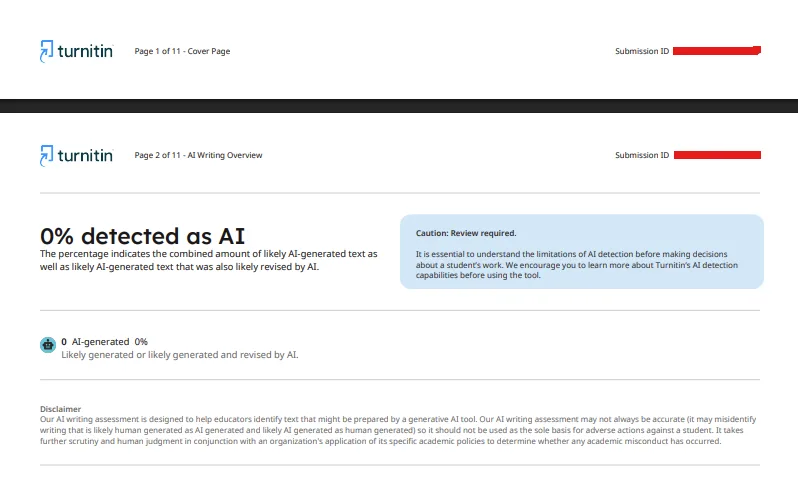
0% detected as AI
The report indicates that the detector did not identify qualifying text as likely AI-generated.
For students, this can be useful information when reviewing their work.
However, a 0% result does not guarantee that a document was entirely human-written.
AI detection tools are not perfect, and their findings should always be interpreted carefully.
There is also an important difference between *0% AI and % AI:
0% AI: No qualifying text was identified as likely AI-generated.
*% AI: Some qualifying text was flagged, but the result was above 0% and below 20%, so no numerical score or highlights are displayed.
TTN Check helps students access available reports and understand these distinctions.
Understanding Turnitin Plagiarism and Similarity Reports
Turnitin Similarity Reports work differently from AI detection.
A Similarity Report compares submitted writing against available sources, including websites, publications and previously submitted student papers.
The report highlights matching text and calculates an overall similarity percentage.
However, similarity does not automatically mean plagiarism.
Properly referenced quotations, common academic terminology and other legitimate matches can contribute to a similarity score.
Real Turnitin Example: 8% Overall Similarity
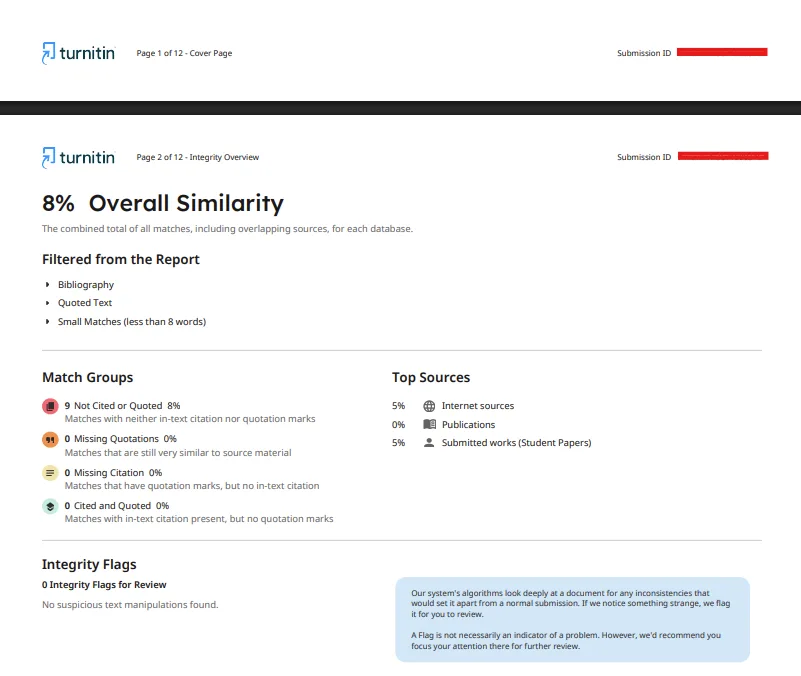
The sample Turnitin Similarity Report displays: 8% Overall Similarity
The report provides the following information:
Internet sources: 5%
Publications: 0%
Submitted student papers: 5%
Not cited or quoted: 8%
Missing quotations: 0%
Missing citations: 0%
Integrity flags: 0
The source categories can overlap, meaning their percentages should not simply be added together.
The report also shows that bibliography, quoted text and small matches of fewer than eight words were excluded from the displayed results.
An 8% similarity score indicates relatively limited matching text, but students should still review the highlighted passages.
Is 8% Turnitin Similarity Acceptable in UK Universities?
There is no universal Turnitin similarity percentage accepted by every UK university.
An 8% score might raise few concerns in one assignment, while a particular uncited passage could still require attention.
Likewise, a higher similarity score may include properly acknowledged quotations or references.
The best approach is to review the matched sources and follow your university's academic integrity guidelines.
How TTN Check Helps UK Students Check Assignments Online
TTN – AI & Plagiarism Check provides an online service for students who want to request Turnitin reports without their own university login.
The process is straightforward.
Step 1: Create an Account
Visit https://aiandplagiarismcheck.com/ and register for a free account.
Step 2: Upload Your Assignment
Submit your document in Word or PDF format.
The service can be used for eligible essays, assignments, research papers and dissertation chapters.
Always ensure your institution permits uploading the document to an external checking service.
Step 3: Request Your Turnitin Reports
The TTN team processes eligible documents for Turnitin AI writing detection and similarity checking.
Step 4: Download Your Results
Once processing is complete, your available reports are delivered through your secure user dashboard.
TTN aims to provide reports within minutes, although processing times may vary.
Get your Turnitin AI and Similarity Reports with TTN Check.
Affordable Turnitin Checks for UK Students
University life can be expensive, particularly when balancing tuition fees, accommodation and everyday expenses.
TTN offers document checks for less than USD $5 per document, providing an affordable option for students who want additional information before submitting their work.
Students throughout England, Scotland, Wales and Northern Ireland can access the online service, subject to website and payment availability.
Visit TTN Check – AI & Plagiarism Check to view current pricing and available payment options.
Frequently Asked Questions
Does *% on Turnitin mean my assignment contains AI?
It means Turnitin detected some potentially AI-generated qualifying text below its 20% reporting threshold. It does not establish that AI was actually used.
Why doesn't Turnitin show AI scores below 20%?
Turnitin suppresses numerical scores and highlights for results above 0% but below 20% because they have a higher likelihood of false positives.
Can Turnitin incorrectly flag human-written assignments?
Yes. False positives can occur, so AI detection results should not be used as the sole evidence of academic misconduct.
Is 0% AI detection a guarantee?
No. A 0% result means the detector did not identify likely AI-generated qualifying text. It is not definitive proof of authorship.
Can I use TTN Check without a university Turnitin account?
Yes. TTN offers an independent report-request service without requiring your own institutional Turnitin login.
Final Thoughts: Check Your Assignment with TTN Check
Understanding Turnitin reports is about more than achieving a low percentage.
Whether your report shows *0% AI, % AI or 8% similarity, the important thing is knowing what the results mean and how to interpret them responsibly.
TTN helps UK students access Turnitin reports online, review their documents and make informed decisions before submission.
Visit TTN Check – AI & Plagiarism Check to Get Started
Related Post: How TTN Check Helps Students with Turnitin AI Detection and Plagiarism Checking